QR Code Templates

icon

QR Code for WeChat

WeChat QR code
Connecting with WeChat users has never been easier! Whether you're a business owner looking to expand your market, a professional wanting to network seamlessly, or simply someone who wants to share contact details effortlessly, WeChat QR codes are your solution. With over 1.3 billion monthly active users, WeChat is more than just a messaging app—it's a complete ecosystem for social networking, payments, business, and communication. Let's explore how QR codes for WeChat can streamline your connections and enhance your digital presence!

What is QR Code in WeChat?

A WeChat QR code is a scannable code that provides instant access to your WeChat profile, payment information, contact details, or email. Instead of manually typing WeChat IDs or searching for usernames, people can simply scan your QR code of WeChat profile and connect with you immediately. It can direct them to your profile for instant chat, save your contact information, initiate a payment, or open an email draft.
WeChat QR code - 2
Using QR codes on WeChat makes networking and business operations convenient for everyone involved. No more spelling out complicated usernames, exchanging phone numbers, or dealing with payment delays. Everything is digital, instant, and secure! Plus, it helps you maintain a professional image while keeping all your contact information organized in one scannable code. Additionally, WeChat QR codes make it super easy to bridge offline and online interactions, providing a seamless call to action for your customers, clients, or friends. This way, people can instantly connect with you, make payments, or reach out via email without any hassle.

WeChat: How to Use QR Code?

WeChat QR code - 3

Business Networking & Professional Connections

QR codes for WeChat help professionals exchange contact information instantly at conferences, meetings, and networking events. Instead of fumbling with paper cards, attendees can scan your WeChat QR code business card to access your profile, start a conversation, or save your vCard. This ensures seamless connections without the risk of lost or forgotten business cards. Professionals can use WeChat ID QR codes to share their WeChat profiles, portfolios, or Official Account pages, making networking more efficient and memorable.

Retail & E-commerce Payments

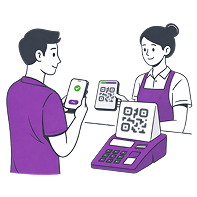
For retail stores, restaurants, and online sellers, a WeChat Pay QR code simplifies transactions. Customers can scan the QR code WeChat Pay to complete purchases instantly without needing cash or cards. This is especially valuable for businesses targeting consumers, as WeChat Pay is one of the most popular payment methods in China. Vendors can use WeChat QR code payment with their e-commerce platforms, streamlining the checkout process and allowing customers to pay directly through their WeChat wallet.
WeChat QR code - 4
WeChat QR code - 5

Customer Service & Support

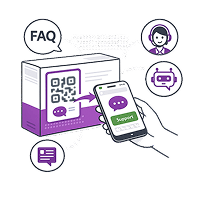
Businesses can use WeChat QR codes to provide instant customer support. By displaying a WeChat QR code link on product packaging, websites, or store counters, customers can quickly connect with support teams for assistance. This reduces response times and improves customer satisfaction. WeChat QR code URLs can direct customers to FAQ pages, troubleshooting guides, or chatbot services for automated assistance.

Marketing & Promotions

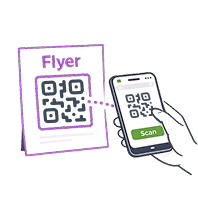
A QR code for WeChat is a powerful marketing tool. Brands can place QR codes on flyers, posters, product packaging, or digital ads to encourage customers to follow their official WeChat accounts. This helps businesses build a loyal audience, share exclusive promotions, and engage customers with interactive content. Marketers can also track scan rates to measure campaign effectiveness and optimize their strategies accordingly.
WeChat QR code - 6

How to Create WeChat QR Code?

Creating a QR code for WeChat with ME-QR is simple and takes just a few minutes. Follow these steps:
  • 1
    Visit ME-QR – Open the ME-QR website and navigate to the WeChat QR code maker.
  • 2
    Choose Your QR Code Type – Select whether you want to convert your WeChat ID to QR code or create QR codes for vCard, chat, payment, or email.
  • 3
    Enter Your Information – Input relevant details like your link to your profile, payment information, contact details, or email address.
  • 4
    Generate Your QR Code – Click "Customize & Download QR" and let ME-QR generate WeChat QR code instantly!
  • 5
    Customize (Optional) – Change colors, shapes, or add your logo to match your personal or brand identity.
  • 6
    Test Before Downloading – Scan the generated WeChat QR code to ensure it links correctly. Testing helps avoid any issues and ensures a smooth experience for users.
  • 7
    Download & Share – Download & Share – Save your QR code as PNG, SVG, PDF, EPS, or JPG in the size you need, then use it on business cards, websites, or marketing materials.

Why WeChat QR Code Generator from ME-QR the Best?

QR codes WeChat users rely on? ME-QR offers all the tools to create and manage them efficiently. Here's why it's the best choice:
  • icon-qr2

    Dynamic QR Codes: Need to update your WeChat profile link or payment details? No problem! ME-QR lets you edit your dynamic WeChat QR codes without changing the actual code. This means you can update information on the go without reprinting materials.

  • icon-qr2

    Trackable & Analytics-Ready: See how many people scanned your WeChat QR code on business card or poster and analyze user engagement. This data helps you measure the effectiveness of your networking efforts, marketing campaigns, or customer outreach strategies.

  • icon-qr2

    Custom Branding: Personalize your WeChat QR code with your logo, favorite or brand colors, and unique design elements. A branded QR code enhances recognition and trust, making it more likely that people will scan it.

  • icon-qr2

    Multiple QR Code Types: Whether you need a WeChat QR code for email, profile connection, payment processing, vCard sharing, or email communication, ME-QR supports all these formats in one platform.

If you're looking to connect with contacts, streamline transactions, or join WeChat groups, a QR code for WeChat is an essential tool that makes networking, payments, and communication faster and more efficient. From QR code with link to WeChat profile and chat to vCard and payment codes, a simple scan can transform how you interact with customers, clients, and contacts. And with ME-QR, you get a powerful, easy-to-use WeChat QR code creator that ensures seamless connections.

So why wait? Make a QR code for WeChat today and take your networking and business operations to the next level! WeChat QR codes are the future of digital communication in the Chinese market and beyond, making everything faster, smoother, and more interactive. Try ME-QR now and experience the difference!

You can generate your WeChat QR code on ME-QR, or open the WeChat app and tap on the "+" icon in the top right corner, then select "QR Code." Your personal QR code will appear on the screen, which others can scan to add you as a contact. You can also save or share this QR code directly from the app.

To scan a QR code in WeChat, tap the "+" icon at the top right of the app and select "Scan QR Code." Point your camera at the QR code you want to scan. WeChat will automatically recognize it and take the appropriate action, such as adding a contact or opening a link.

WeChat QR codes expire for security reasons to prevent unauthorized access and protect user privacy. Your personal profile QR code is permanent and does not expire as long as your account remains active. However, temporary QR codes for group invites typically expire after 7 days, while verification QR codes for login or registration expire within 10 minutes. This ensures that only intended recipients can use these codes within a specific timeframe.

To pay using a QR code on WeChat, open WeChat Pay and select "Scan" or "Money" to display your payment QR code. The merchant can scan your code, or you can scan the merchant's QR code to complete the transaction. Enter your payment password to confirm and complete the purchase.

WeChat allows limited customization of your personal QR code within the app—you can add a profile photo and background. For more advanced QR code customization with colors, logos, or designs, you can use ME-QR QR code generators to create a branded WeChat QR code.

Was This Article Helpful?

Click on a star to rate it!

Thank you for your vote!

Be the first to rate this post!