TOP QR Code MCP Server
To create a QR code for a link, video or picture - click on the button below.


- Why Use a Model Context Protocol MCP Server
- Benefits of an MCP Server for AI and QR Automation
- How We Tested MCP Server Solutions
- Testing Methodology
- Comparison of MCP Server Solutions
- Best QR Code MCP Server Solutions
- Common MCP Tools and QR Code Workflows
- How to Connect ME-QR's MCP Server to Your AI Assistant
- Best Practices for QR Code MCP Server Workflows
- Conclusion
-
Frequently Asked Questions
- What is a QR code MCP server?
- Which platforms offer an MCP server for QR codes?
- Can an AI assistant update a QR code after it's already printed?
- Do I need to know how to code to use a QR code MCP server?
- Is there a free QR code MCP server available?
- Should every QR code generator support AI integrations?
Artificial intelligence is becoming part of everyday workflows, and most AI assistants still need a reliable way to communicate with external services. The Model Context Protocol (MCP) solves this by giving AI applications one standardized way to communicate with external tools. Developers expose a service once, and compatible AI clients work with it through the same protocol.
For QR code automation, this opens new possibilities. An AI assistant can generate QR codes, update existing ones, retrieve analytics, or manage campaigns without switching apps. A QR-focused MCP server makes these actions available through one interface.
Why Use a Model Context Protocol MCP Server
An MCP server sits between the AI client and the services it needs to access. It receives requests from the assistant, translates them into the appropriate actions, and returns the results through the same protocol.
For QR code automation, one server can handle QR generation, campaign updates, analytics, and content management. The AI assistant decides which tool to call based on the user's request, while the server performs the work.
Common reasons to use an MCP server include:
- connecting AI assistants with QR code services through a standardized interface;
- reducing custom integrations across different AI platforms;
- managing QR code creation, editing, and analytics from one workflow;
- supporting automation for business processes and marketing campaigns;
- simplifying maintenance as AI applications continue to evolve.
A practical example is a company that uses both an internal AI assistant and a customer-facing chatbot. Both clients connect to the same MCP server and use identical QR tools without maintaining two separate integrations. The same server can generate a simple link QR code today and manage larger business QR workflows tomorrow.
Benefits of an MCP Server for AI and QR Automation
An MCP server does more than connect an AI assistant to an API. It puts tool discovery, data exchange, and action execution behind one shared layer, so product teams don't spread the same logic across multiple integrations.
A Standard Interface for AI Applications
Imagine adding QR generation to both Claude Desktop and an internal AI assistant. Without MCP, each application would typically need its own integration. With the Model Context Protocol, both clients communicate with the same server and use the same QR tools.
Teams spend less time maintaining integrations and more time building new features, since the communication layer stays consistent across different AI clients.
Faster Development and Maintenance
Projects often grow beyond a single AI application — a team often starts with one internal assistant, then adds a chatbot and later a Slack bot for support staff, all needing the same QR functionality.
Once QR features are available through an MCP server, none of the new clients need another integration. Updates happen once on the server instead of being repeated across every client.
Better Automation with MCP Tools
A support chatbot may need to generate a QR code, rename a campaign, and retrieve last week's scan analytics during the same conversation. It doesn't switch between separate plugins — it simply calls the MCP tools already exposed by the server.
Those tools may include QR code generation, campaign management, analytics, or content updates. AI engineers expose these capabilities once, while AI clients decide when and how to use them.
Flexible QR Code Workflows for Businesses
A retailer running an e-commerce storefront may ask an AI assistant to create QR codes for new products, while the marketing team later requests campaign analytics for the same promotion — both handled through one MCP server, without switching platforms.
ME-QR follows this approach by supporting multiple QR code types, dynamic management, and analytics within one platform, keeping campaigns, content, and reporting connected in a single workflow.
How We Tested MCP Server Solutions
Not every MCP server is built for the same purpose. Some projects only generate QR codes, while others also retrieve analytics, manage existing codes, or fit into larger AI workflows. To make the comparison fair, we evaluated each server using tasks developers actually perform when building AI-powered applications.
The evaluation focused on these criteria:
- Model Context Protocol compatibility.
- Ease of installation and configuration.
- Support for QR code creation and management.
- MCP tools available and workflow flexibility.
- Documentation, maintenance, and developer experience.
Testing Methodology
Rather than checking feature lists, we used each solution in practical development scenarios:
- generated QR codes for simple links and tested how different AI clients handled them;
- created QR codes from structured text prompts and verified the output;
- tested how the server handled multiple tool requests within one conversation;
- reviewed installation, configuration, and available documentation;
- compared how easily each server could be adapted with extra tools for business workflows.
During testing, one difference stood out: some projects expose only a single QR generation tool, while others let developers build broader workflows around QR management — a gap that grows as AI applications move beyond simple one-step requests.

Comparison of MCP Server Solutions
Choosing an MCP server is not only about generating QR codes. Engineering teams also look at how easily it fits into existing AI workflows and how much customization is possible without rewriting the project.
ME-QR ranks at the top because it combines QR code management with an MCP implementation designed for practical automation. It supports generating PDF QR codes, creating dynamic custom URLs, and integrating these workflows directly into AI-powered applications through a single MCP server.
|
MCP Server |
QR Code Support |
MCP Tools |
Open Source |
Best For |
Notes |
|---|
|
ME-QR MCP Server |
Yes |
Multiple |
No |
Production QR workflows |
QR generation, management, analytics, AI automation |
|
QRCodeKIT MCP |
Yes |
Basic |
No |
Quick QR creation via chat |
No branding or analytics through MCP yet |
|
QR Planet MCP Server |
Yes |
Multiple |
No |
Full-featured campaigns and geo-targeting |
Dynamic routing, analytics, business cards, coupons |
|
QRTIGER MCP (via Zapier) |
Yes |
Multiple |
No |
Teams already using Zapier |
Runs through Zapier's MCP layer, not a native server |
|
Uniqode MCP (via Zapier) |
Yes |
Multiple |
No |
Enterprise and multi-location campaigns |
Same Zapier-based access as QRTIGER |
|
jwalsh MCP QR Server |
Yes |
Basic |
Yes |
Learning and prototypes |
Lightweight QR generation example |
|
Enhanced QRCode MCP |
Yes |
Basic |
Yes |
Custom development |
Community implementation with room for extension |
|
QR Scanner MCP |
Scan only |
Limited |
Yes |
QR scanning workflows |
Focused on reading QR codes rather than creating them |
A prototype built around a single QR generation tool may be enough for testing, but production projects usually grow beyond one capability. As analytics or campaign management become part of the workflow, switching servers is often harder than picking a scalable solution early on.
Best QR Code MCP Server Solutions
A simple MCP prototype and a production-ready QR platform may both follow the same protocol, but they solve different problems. The right choice depends on whether you need a quick proof of concept or a server that supports real AI workflows over time.
ME-QR MCP Server
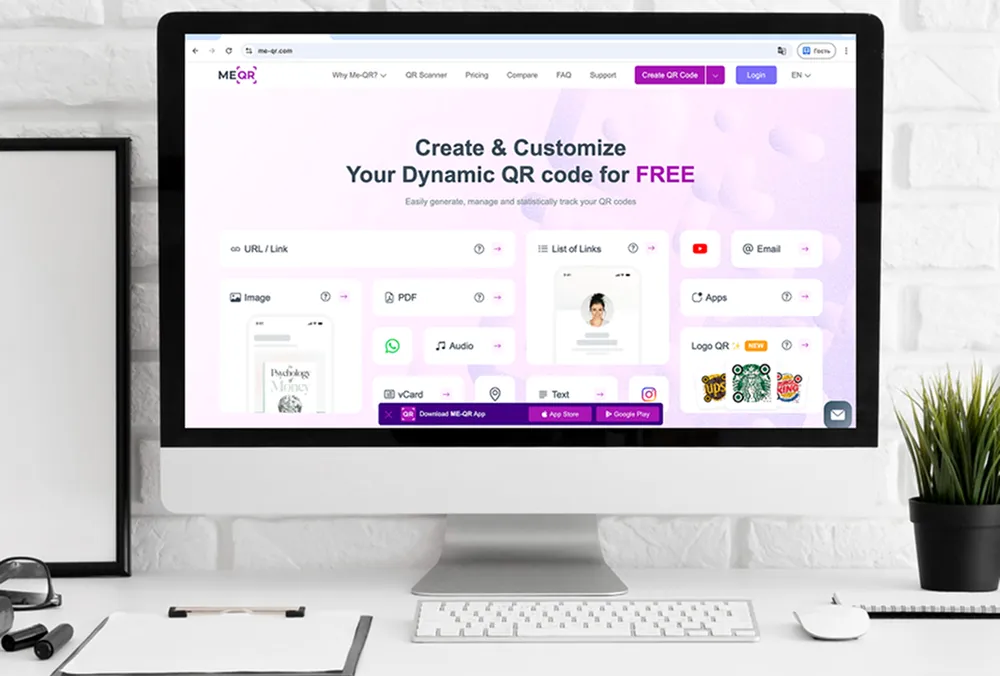
ME-QR MCP Server connects AI applications with QR code functionality through the Model Context Protocol. Instead of exposing only a single QR generation endpoint, it supports broader workflows such as creating, updating, and managing QR codes from within an AI conversation, including branded QR codes with a logo and dynamic destinations. Teams can also automate dynamic QR updates, scan analytics, PDF QR codes, and campaign organization without leaving the AI conversation. A marketing team, for example, can ask an AI assistant to launch a QR campaign for a new product, update the landing page later that day, and review scan analytics the following morning — all in the same conversation.
Key Features
- QR code generation through MCP
- Dynamic QR code management and multiple QR code types
- Campaign management and analytics support
Pros
- Built for real-world QR workflows and AI automation projects
- Can grow as new MCP tools are added
Cons
- Requires an MCP-compatible client
- Best suited for developers familiar with AI integrations

QRCodeKIT MCP
QRCodeKIT keeps its MCP server intentionally narrow — create, view, download, or delete QR codes through plain-language prompts, with branding and analytics still on the roadmap rather than available today. The platform focuses on handling common QR tasks through natural-language prompts, not on exposing dozens of specialized tools.
Key Features
- Create, list, download, and delete QR codes via chat
- Every generated code is dynamic by default
Pros
- Simple setup with an existing account, no coding required
- Fits small projects where QR generation is the only requirement
Cons
- No custom branding, logos, or analytics available through MCP yet
- Feature set is still expanding, so some workflows aren't supported today

QR Planet MCP Server
QR Planet built one of the most complete MCP servers on this list — beyond creating and updating codes, it exposes geo-targeted redirects, GS1 Digital Link support, digital business cards, and coupon tracking, all through the same AI conversation.
Key Features
- Dynamic QR creation, editing, and deletion through MCP
- Geo-targeted redirects by country, language, or geofence
- GS1 Digital Link, business cards, and coupon tracking
Pros
- Covers far more than QR generation — campaigns, geo-targeting, and business cards in one server
- Works with Claude, ChatGPT, Gemini, and other MCP clients out of the box
Cons
- The sheer number of tools can be more than a small business needs
- Best suited for teams already running QR campaigns at scale

QRTIGER MCP (via Zapier)
QRTIGER doesn't run its own MCP server — its QR actions are exposed through Zapier's MCP layer instead, so an AI assistant reaches QRTIGER the same way it reaches any of Zapier's other integrations.
Key Features
- QR creation actions for URLs, app stores, email, and social profiles
- Access through Zapier's shared MCP endpoint, not a dedicated server of its own
Pros
- Useful if a team already automates other tools through Zapier
- No separate MCP server to host or maintain
Cons
- Each tool call counts against Zapier's task quota, not a QRTIGER plan
- Less direct than a platform's own native MCP server

Uniqode MCP (via Zapier)
Uniqode's MCP access runs through the same Zapier layer as QRTIGER, but the product behind it targets multi-location and enterprise QR campaigns, with SOC 2 and HIPAA-level security built in.
Key Features
- Access to Uniqode's dynamic QR and campaign actions via Zapier
- Enterprise-grade security and compliance controls
Pros
- Fits organizations already running Uniqode for branded, multi-location campaigns
Cons
- Depends on Zapier for MCP access instead of a server Uniqode hosts directly
- More infrastructure than a small business typically needs
jwalsh MCP QR Server
Built as a small open-source demo, jwalsh MCP QR Server shows how QR generation works through MCP — better suited to learning and prototypes than full campaign workflows.
Key Features
- QR code generation, open-source codebase, simple MCP implementation
Pros
- Easy to explore and useful for protocol experiments
Cons
- Limited functionality, not built for large-scale deployments

Enhanced QRCode MCP
Enhanced QRCode MCP extends basic QR generation with extra customization options — a starting point for developers who want more control than a minimal demo server offers.
Key Features
- QR generation with customization options, open-source implementation
Pros
- Can be adapted for small projects, easy to modify
Cons
- Feature depth depends on community updates, limited tooling beyond the basics
QR Scanner MCP
Unlike the other servers in this comparison, QR Scanner MCP focuses on reading existing QR codes rather than generating new ones — useful when an AI application needs to extract information from a code and pass it into another process.
Key Features
- QR scanning, data extraction, MCP compatibility
Pros
- Covers QR reading scenarios, lightweight implementation
Cons
- Does not focus on QR creation, no built-in campaign or analytics tools
Common MCP Tools and QR Code Workflows
An MCP server becomes more useful as it exposes more than one tool. Generating a QR code is often just the first step, and developers usually combine several actions into one workflow.
QR Code Generation
Creating a QR code is the most common operation exposed by a QR-focused MCP server. An AI assistant can generate a code from a URL, plain text, an image, or another supported format based on a natural language request.
For example, a developer can ask an assistant to create a QR code for product documentation, a support page, or a downloadable PDF. The server returns the finished QR code without a separate dashboard.
Campaign Management
Production projects rarely stop after creating a QR code. Marketing teams often rename campaigns, update destinations, or organize hundreds of codes into collections, including employee contact cards built with vCard QR codes that need to stay in sync across campaigns.
Instead of editing everything manually, the AI assistant sends those requests to the MCP server and keeps the campaign up to date — which matters most when marketing, sales, and support all pull QR codes from the same pool.
Analytics and Reporting
Someone on the marketing team might ask, “Which campaign received the most scans last week?” Rather than exporting a report by hand, the assistant pulls the numbers straight from the server and summarizes them.
When those QR codes are part of larger marketing campaigns, that weekly reporting task becomes a one-line question.
Dynamic QR Code Updates
QR destinations often change after a campaign has launched. A landing page moves, a document gets a new version, a booking link changes, or a promotion ends early.
With dynamic QR management, the AI assistant can update the destination while keeping the printed QR code unchanged, removing the need to reprint materials every time the link changes.
Multi-Step AI Workflows
The biggest advantage of an MCP server appears when several tools work together. An assistant can generate a QR code, attach it to a campaign, update its destination, and return scan analytics — all in the same conversation.
At that point, the MCP server stops being just a QR tool and becomes part of the application's infrastructure — managing an entire campaign without someone jumping between four dashboards.
How to Connect ME-QR's MCP Server to Your AI Assistant
Setting up ME-QR's MCP server takes about five minutes, whether you connect through a browser-based assistant like ChatGPT, Claude, or Grok, or through a terminal for deeper developer control.
Step 1. Find the Connectors Settings and Add a New One
In your AI assistant's settings, look for the section that manages external connectors — "Apps" under Developer mode in ChatGPT, "Connectors" under Customize in Claude, or "Skills and Connectors" in Grok. From there, create a new custom connector and give it a clear name, such as "QR code generator."
Step 2. Enter the ME-QR MCP Server Address
Paste the server URL — https://mcp.me-qr.com/mcp — into the connector's URL field. This address is the same across ChatGPT, Claude, and Grok, and it's the only technical detail the setup requires.
Step 3. Authorize the Connection
Confirm the connection and sign in with your ME-QR account when prompted. Staying logged into ME-QR in the same browser as the AI assistant helps the authorization complete smoothly.
Step 4. Start Generating QR Codes
Once connected, describe what you need in plain language — "create a QR code for my LinkedIn profile" or "make a Wi-Fi QR code for my coffee shop" — and the assistant calls the right ME-QR tool automatically.
Step 5. Connect via Terminal with Claude Code (Optional, for Developers)
Teams that need QR generation inside scripts or CI/CD pipelines can reach the same MCP server through Claude Code instead. Run claude mcp add me-qr -s user --transport http https://mcp.me-qr.com/mcp from the terminal, then authenticate with the /mcp command inside a Claude Code session.

Best Practices for QR Code MCP Server Workflows
A QR-focused MCP server should be easy for an AI client to use, but it also needs clear limits. If every tool is exposed without structure, the assistant may call the wrong action or return results that are hard to trust.
- Start with a small tool set before adding complex workflows.
- Use clear tool names so the AI client understands each action.
- Keep inputs strict by validating URLs, campaign IDs, file types, and analytics ranges.
- Separate test environments from production QR campaigns.
- Log tool calls so teams can trace every action the assistant performs.
- Protect sensitive workflows with access rules, especially in private or enterprise deployments.
A local MCP server helps when a company needs more control over data or internal tools, running QR automation for private documents inside its own network.
Whether the server runs locally or in production, the same principles apply: expose only the tools the client needs, validate every request, and keep every action traceable.
Conclusion
The Model Context Protocol (MCP) turns “build another integration” into “expose one more tool.” For QR code automation, that means an AI assistant can generate codes, update campaigns, retrieve analytics, and complete related tasks during one conversation instead of relying on separate integrations for every new request.
Choosing the right MCP server is less about the first QR code and more about what happens after — production systems usually grow to include reporting, campaign management, and dynamic QR updates, so starting with a server built to evolve saves time later.
ME-QR follows that same evolve-ready approach by keeping QR management and AI-ready automation inside the same platform, letting teams expand workflows as new requirements appear without moving operations between separate systems.
Frequently Asked Questions
A QR code MCP server is an MCP-compatible tool that lets an AI assistant create, update, or manage QR codes directly from a conversation, without a developer building a custom integration for every request.