Sharing Folders on ME-QR: A Smarter Way to Manage QR Codes Collaboratively
To create a QR code for a link, video or picture - click on the button below.


- What Is Folder Sharing on ME-QR?
- How Folder Sharing Works on ME-QR
- Access Levels: Full Control Without Compromising Security
- Why Sharing Folders on ME-QR Is a Game Changer
- Ideal Use Cases for Folder Sharing on ME-QR
- ME-QR Folder Sharing vs Traditional QR Management
- Best Practices for Using Folder Sharing Effectively
- Conclusion
- Frequently Asked Questions about Sharing Folders on ME-QR
Managing multiple QR codes can quickly become overwhelming, especially when teams, clients, or partners need access. ME-QR solves this challenge with its Folder Sharing feature — a powerful tool designed to streamline collaboration, improve access control, and keep QR code management organized and secure.
In this article, we’ll explore how Sharing Folders on ME-QR works, why it matters, and how businesses and teams can use it to collaborate more efficiently.
What Is Folder Sharing on ME-QR?
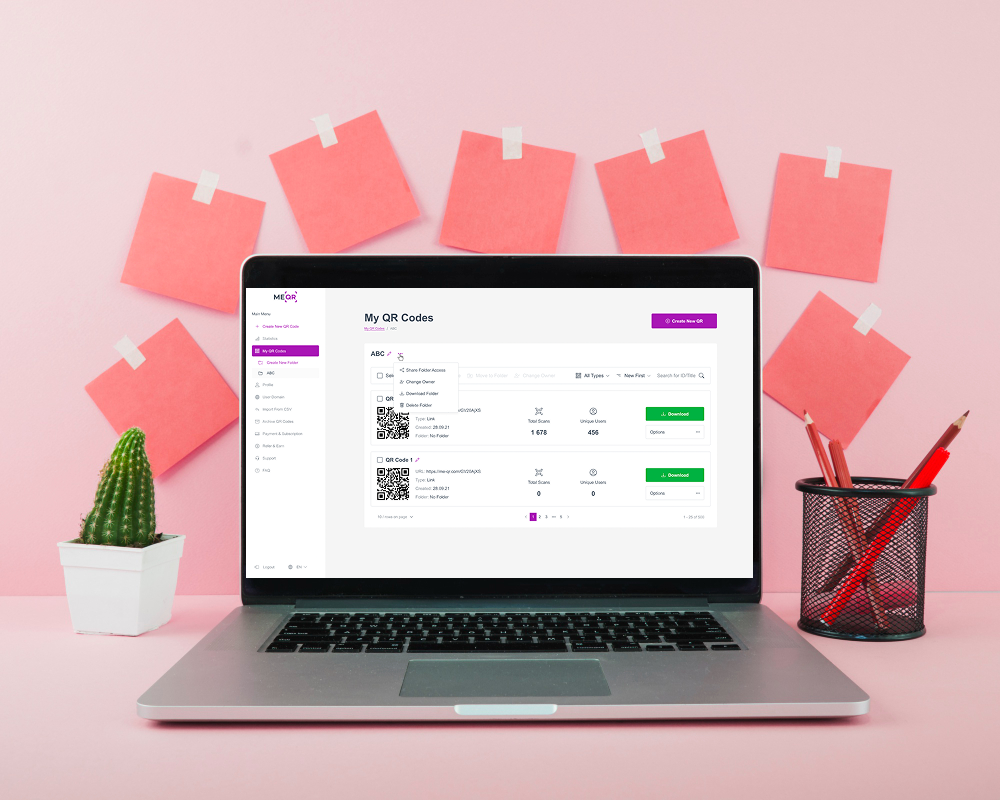
Folder Sharing on ME-QR allows users to grant controlled access to a specific folder of QR codes instead of sharing login credentials or individual files. With this feature, folder owners can invite other registered ME-QR users by email and assign them specific access levels, such as viewing or editing QR codes.
This functionality is especially useful for marketing teams, agencies, franchises, and organizations that manage QR codes collaboratively while maintaining security and accountability.
How Folder Sharing Works on ME-QR
The folder sharing process is intuitive and user-friendly:
- Navigate to My QR Codes
- Select a folder
- Click Share Folder Access
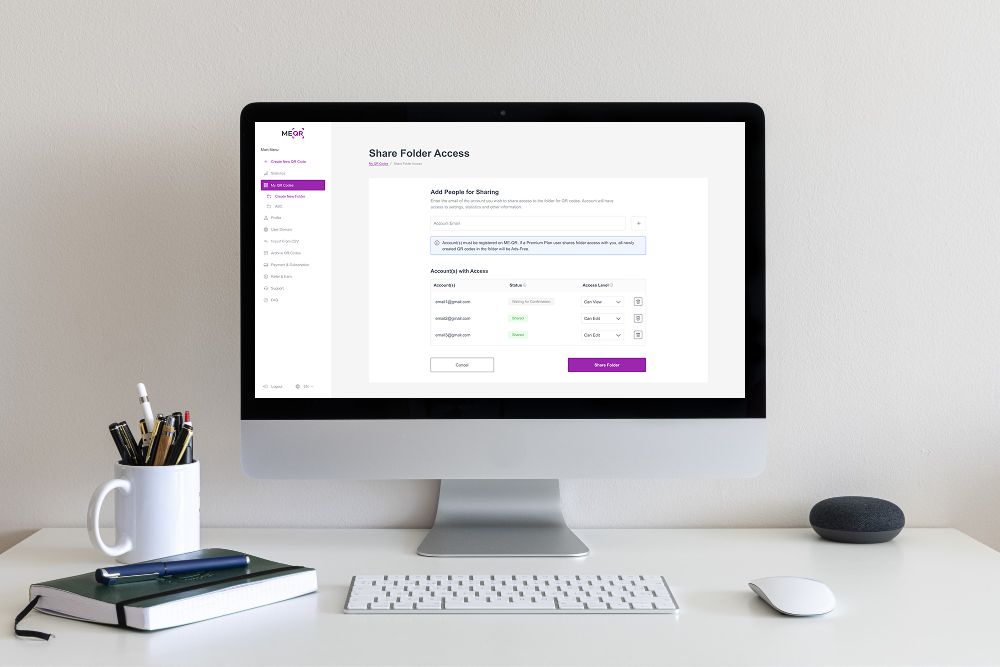
- Add the recipient’s registered email address
- Assign an access level (View or Edit)
- Send the invitation
Once invited, the user receives a confirmation email. After acceptance, they can access the shared folder directly from their ME-QR dashboard.
Access Levels: Full Control Without Compromising Security
One of the biggest strengths of ME-QR folder sharing is role-based access. Folder owners decide exactly what collaborators can do.
Why Sharing Folders on ME-QR Is a Game Changer
- Better Team Collaboration: Multiple users can work on the same QR campaigns without confusion or duplicated effort.
- Centralized QR Code Management: All QR codes stay neatly organized in folders, making them easy to locate and manage.
- Improved Security: No need to share passwords. Access can be revoked or changed at any time.
- Real-Time Updates: Any edits made to a QR code are instantly visible to all authorized users.
- Scalable for Businesses: Perfect for agencies managing multiple clients or enterprises handling large QR code libraries.
Ideal Use Cases for Folder Sharing on ME-QR
- Marketing Teams managing campaign QR codes
- Agencies collaborating with clients
- Retail Chains & Franchises sharing QR assets across locations
- Event Organizers coordinating multiple QR codes
- Educational Institutions managing digital resources
Folder sharing allows everyone involved to stay aligned — without clutter or miscommunication.

ME-QR Folder Sharing vs Traditional QR Management

Best Practices for Using Folder Sharing Effectively
- Assign View access for stakeholders who only need insights
- Grant Edit access only to trusted collaborators
- Regularly review shared users and revoke unused access
- Organize QR codes into clearly named folders
- Use ME-QR scan analytics to track performance collectively
Following these practices keeps your QR ecosystem clean, efficient, and secure.
Conclusion
The Sharing Folder feature on ME-QR transforms how teams manage QR codes. By combining folder organization, role-based access, and secure collaboration, ME-QR makes QR code management smarter, faster, and safer.
Whether you’re a solo marketer or a large organization, folder sharing empowers you to collaborate effortlessly while staying in full control. If you’re serious about scalable QR code management, ME-QR’s folder sharing is a feature you simply can’t ignore.
Frequently Asked Questions about Sharing Folders on ME-QR