Whether you're building a marketing campaign, sharing a Wi-Fi password, or linking a digital business card, MCP turns QR code creation into a natural part of your AI workflow. And the best part? You only need a free account with your AI of choice to get started.
Connect ME-QR to Your Favorite AI Assistant
Set it up once. Get QR codes in every conversation. Learn exactly how to link ME-QR with the world's most popular AI assistants — ChatGPT, Claude, and Grok — using MCP (Model Context Protocol). Each connection lets you generate, update, and track QR codes for links, PDFs, business cards, Wi-Fi, and more — all through a simple conversation. No extra tools, no manual exports, no tab-switching. Every integration is designed for instant setup and works on a free plan. Connect one time, and let your AI handle QR codes as a natural part of your daily workflow. Click any logo below to jump to a step-by-step setup guide and see it in action.



Stop Switching Tabs. Start Making QRs With AI.
Most people still create QR codes the same way — through a separate tool:
- Open a separate tool
- Paste a URL and adjust settings
- Download the image
- Go back to whatever they were doing
It works — but it pulls you out of your flow every time you need a new code.
MCP changes that. It gives your AI assistant the ability to create QR codes without you ever leaving the conversation. Think of it as giving your AI a new skill: the ability to act, not just answer.
Here's why users are switching to MCP-powered QR generation:
Speed That Matches Your Thinking
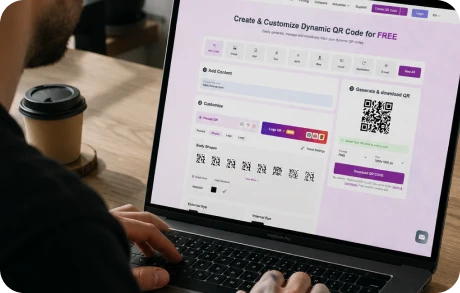
When you're in the middle of a project — drafting a campaign, building a presentation, planning an event — the last thing you want is to context-switch into a separate app. With MCP, you type a single request and get a QR code back in the same chat window. No extra tabs. No copy-pasting links. No re-entering settings you've already decided on.
Works In Plain Language
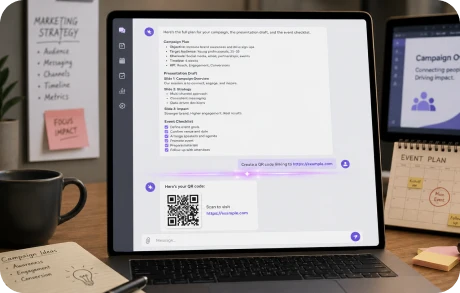
You don't need to know any technical commands or API syntax. You write naturally — "Create a QR code for my LinkedIn profile" or "Make a Wi-Fi QR code for my coffee shop" — and your AI handles the rest. MCP translates your intent into action automatically.

Dynamic QR Codes You Can Update
With standard QR code tools, if you change a destination URL, you have to generate a new code. With MCP, you can update an existing QR code's content without reprinting anything. Just ask your AI to point it somewhere new.
Free to Start
You don't need a paid AI subscription to use MCP for QR code generation. ChatGPT, Claude, and Grok all offer free plans that support MCP connectors. If you already use any of these tools, you're already ready to go.
What Can MCP Do With QR Codes?
MCP gives your AI assistant access to a full suite of QR code actions — organized into three categories:
Generate QR Codes
Update Existing QR Codes
Manage & Analyze
Connect MCP to Your AI in Minutes
Setting up MCP is a one-time step. After that, your AI assistant can generate QR codes whenever you ask.
Note: You must be logged in to the ME-QR account in the same browser as the AI assistant to ensure a smooth process.
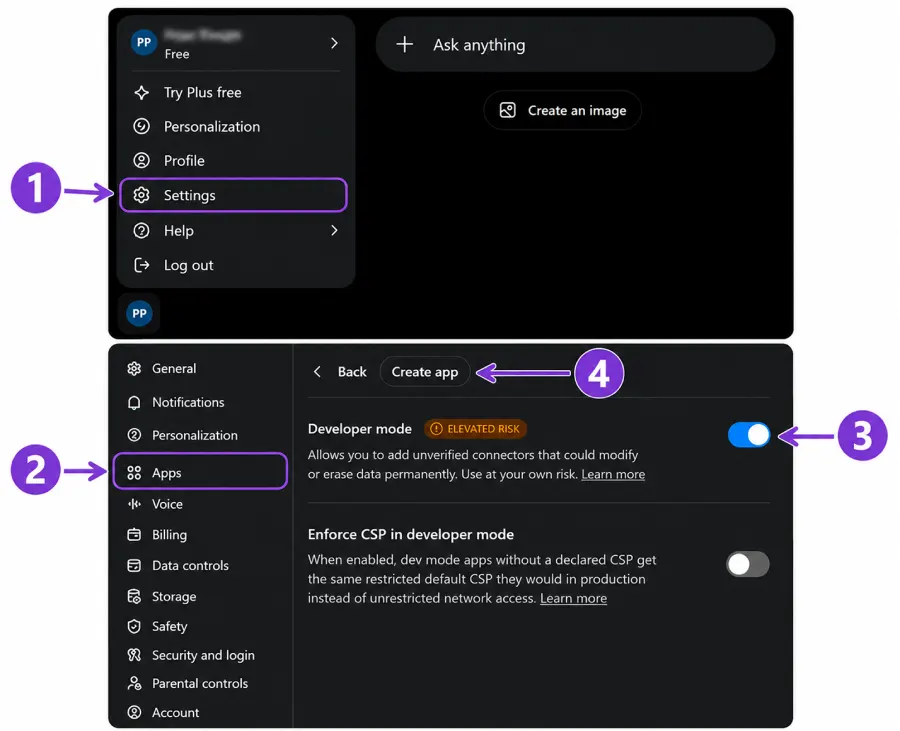
MCP with ChatGPT
ChatGPT supports MCP connectors directly through its web interface — no downloads or technical setup required. All you need is a free ChatGPT account.
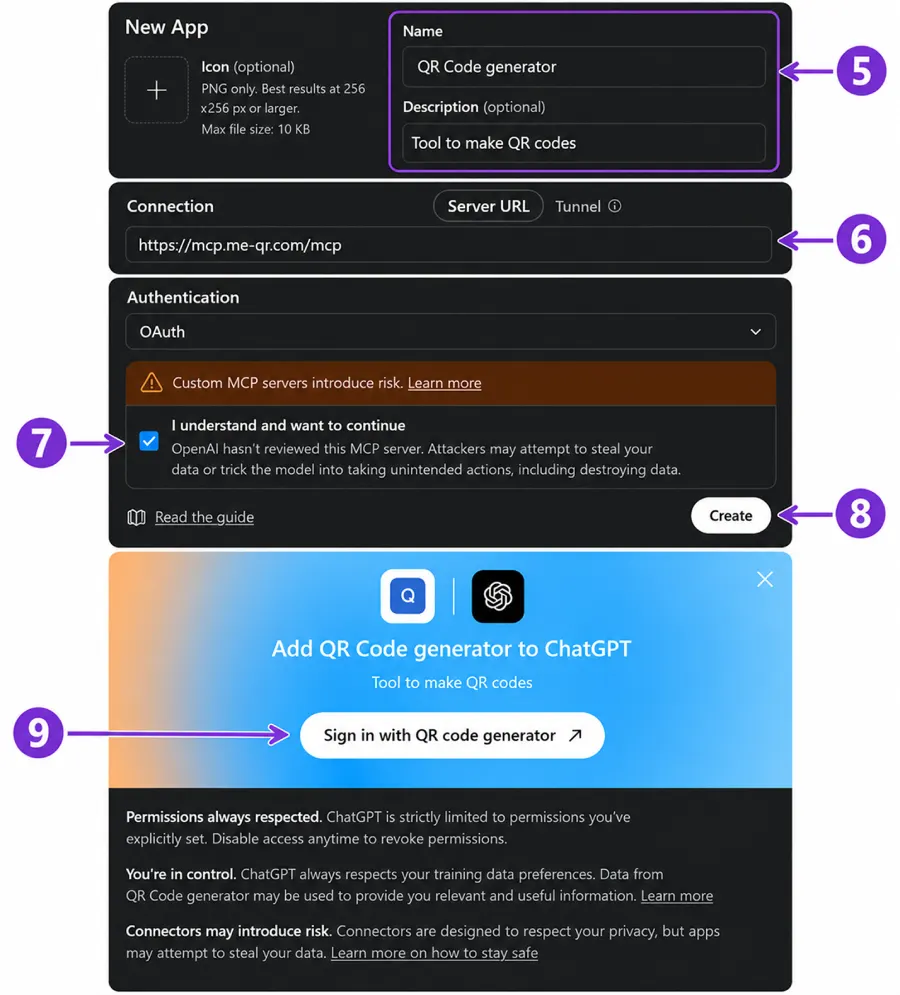
How to connect MCP with ChatGPT in your browser:
- Go to "Settings".
- Select "Apps".
- Select "Developer mode"
- Press the "Create app" button
- Enter a clear name for the connector and, optionally, add a description.
- Enter the MCP server URL- address https://mcp.me-qr.com/mcp
- Press the checkbox with “I understand and want to continue”
- Press the "Create" button
- Press "Sign in with QR code generator"
Once connected, you can start generating QR codes immediately. Just type something like: "make qr code for URL https://me-qr.com/page/features/qr-codes-for-business with the name 'Article for QR codes in business' "and ChatGPT will handle the rest, and the new QR code will be available in your ME-QR dashboard.
Try it in ChatGPT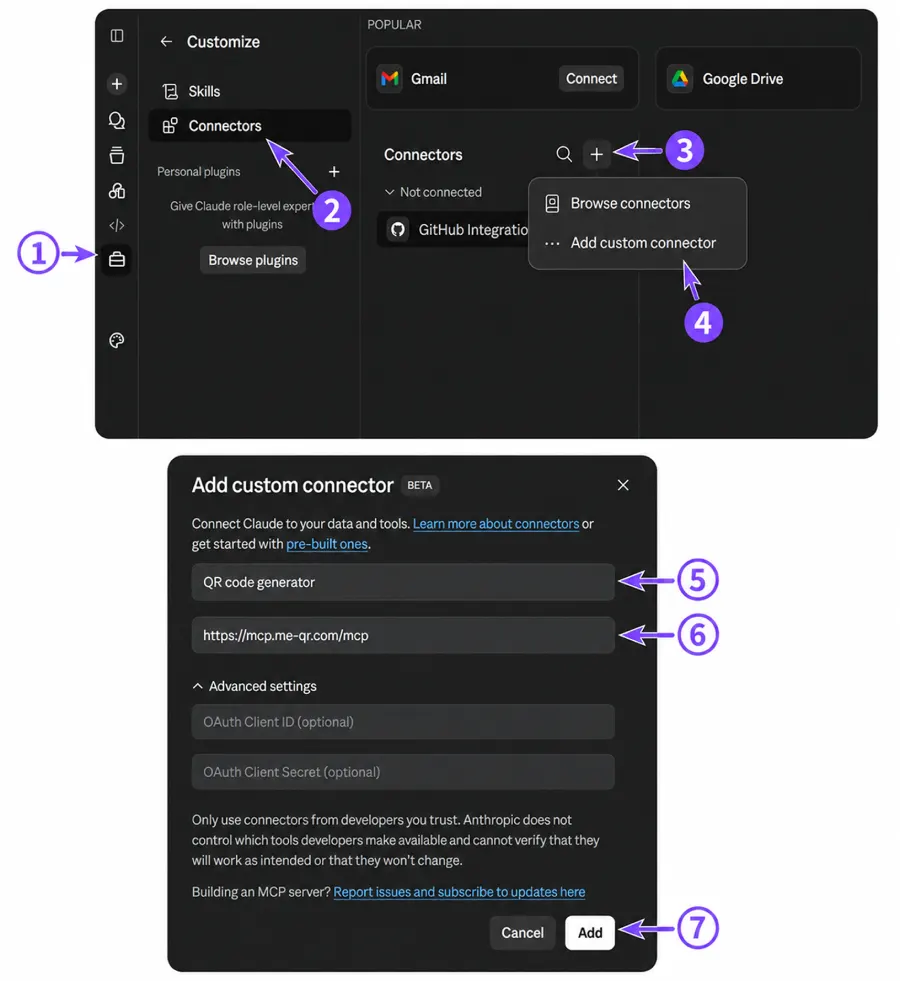
MCP with Claude
Claude (made by Anthropic) supports MCP connectors natively through claude.ai — available on the free plan.
How to connect MCP with Claude in your browser:
- Click the "Customize" icon in the left sidebar
- Select "Connectors"
- Click the + icon next to "Connectors"
- Select "Add custom connector"
- Enter a connector name (e.g. "QR code generator")
- Add the MCP server URL: https://mcp.me-qr.com/mcp
- Click "Add"
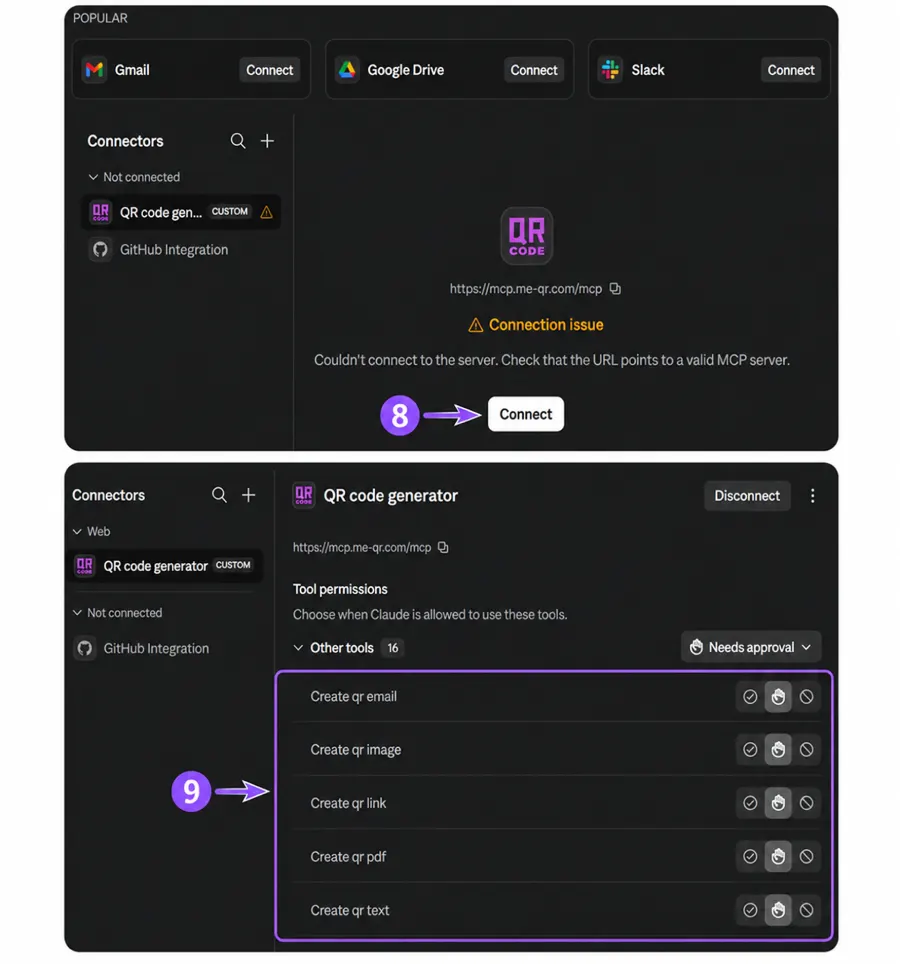
- Click "Connect" to authorize the connection
- Your QR code tools are now available. You can set permissions right away — allow all tools at once, or leave it to approve each request individually during the conversation.
MCP with Grok
Grok (by xAI) supports MCP integrations through its web interface, available on the free tier.
How to connect MCP with Grok in your browser:
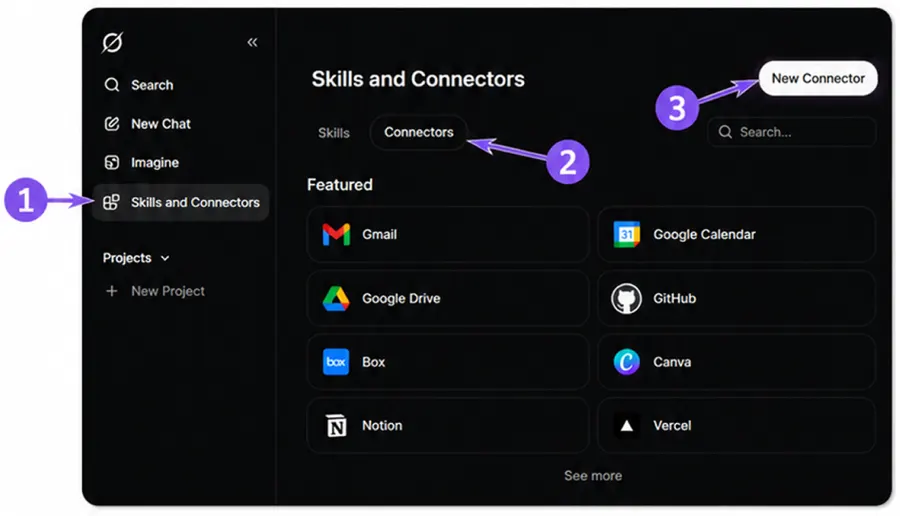
- Click "Skills and Connectors" in the left sidebar
- Select the "Connectors" tab
- Click "New Connector" in the top right corner
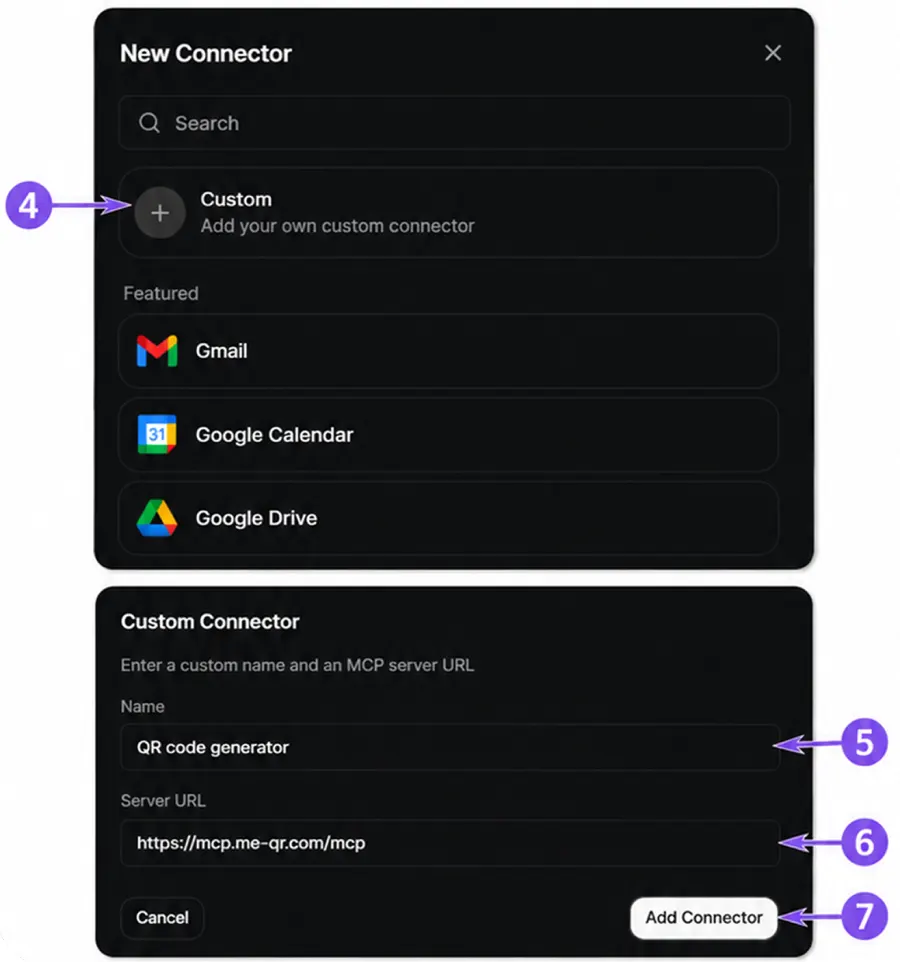
- Select "Custom" — Add your own custom connector
- Enter a connector name (e.g. "QR code generator")
- Add the MCP server URL: https://mcp.me-qr.com/mcp
- Click "Add Connector"
Grok's real-time awareness makes it great for time-sensitive QR code workflows — like generating a QR code for a live event page moments before it goes public.
Try it in GrokMCP via OS Terminal + Claude Code (for developers)
If you're a developer or want deeper control over your QR code workflows, you can connect MCP through Claude Code — Anthropic's AI coding assistant that runs directly in your terminal. This setup lets you automate QR code generation as part of larger workflows: batch processing, scripts, or CI/CD pipelines.
What you'll need before starting:
- A Claude account — Pro, Max, Team, or Enterprise plan (Claude Code is not available on the free plan)
- A ME-QR account
Step 1 — Install Claude Code
macOS / Linux:
curl -fsSL https://claude.ai/install.sh | bashWindows 11 (PowerShell):
irm https://claude.ai/install.ps1 | iexNote: Open PowerShell (not CMD, not Git Bash) and run the command. After installation, open a new PowerShell window — only then will the Claude command become available.
Windows 11 (WinGet — works in both PowerShell and CMD):
winget install Anthropic.ClaudeCodeVerify installation:
claude --versionOn first launch, Claude Code will open your browser to authenticate with your Anthropic account:
claudeThen close the terminal window completely.
Step 2 — Add the ME-QR MCP server
Once authenticated, add the ME-QR MCP server:
claude mcp add me-qr -s user --transport http https://mcp.me-qr.com/mcpVerify it's connected:
claude mcp listStep 3 — Authenticate with ME-QR
Open a new terminal window and launch Claude Code:
claudeType the following command in the chat:
/mcp- Use the arrow keys to select me-qr from the list and press Enter.
- Select "Authenticate" and press Enter — ME-QR will authorize automatically using your account in the browser.
- When you see the message "Authentication successful" — you're ready to go.
Step 4 — Start using it
Open a new terminal window, navigate to your project folder and launch Claude Code:
cd your-project
claude
✨ Logo QR — Previously $100, Now Completely Free!
How People Are Using MCP for QR Codes
MCP isn't just faster - it opens up workflows that weren't practical before. Here are some real scenarios where MCP-powered QR generation makes a genuine difference:
Events & Conferences
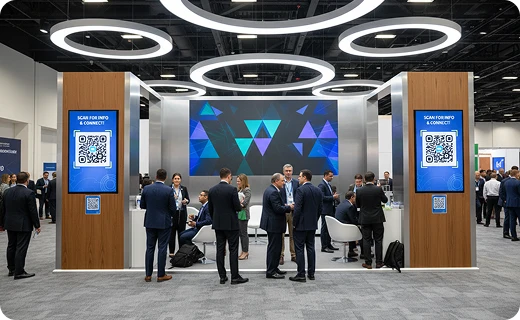
An event organizer uses ChatGPT to generate QR codes for speaker bios, session schedules, and feedback forms — updating them on the fly as the schedule changes, without reprinting signage.
Local Businesses
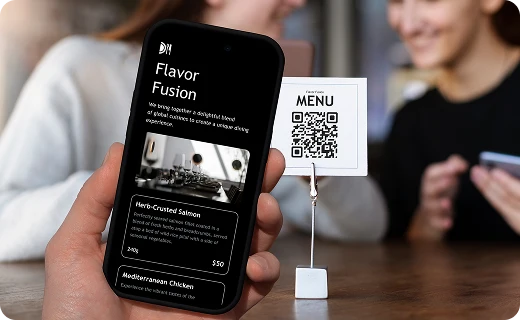
A café owner sets up a Wi-Fi QR code for customers, a menu QR code, and a Google Reviews QR code — all in a single AI conversation. They update the menu link every season without creating new codes.
Personal Branding
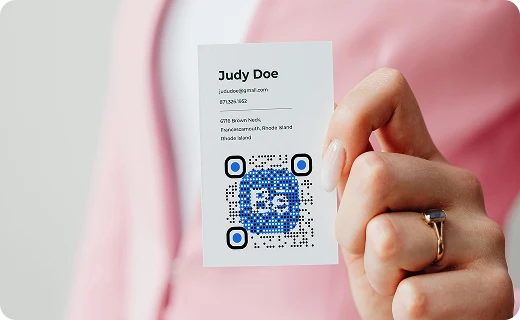
A freelancer generates a vCard QR code for their business card with their AI assistant, then updates it when they change their email — no new print run needed.

Education
A teacher creates QR codes for each lesson's reading material, linking students directly to PDFs and resource pages. New content each week, same QR codes on the classroom wall.
Marketing Campaigns
A marketing team uses MCP to generate and track QR codes for print ads, email campaigns, and social media. Analytics from the get_qr_analytics feature feed back into their performance reports — all inside their AI workflow.
Start Generating QR Codes With Your AI Today
MCP turns your AI assistant into a QR code generator, editor, and tracker — all in one conversation. One request. Done. Pick your AI assistant above, follow the setup guide, and send your first QR code request today. It takes less than five minutes — and once you've tried it, you won't go back.
Get Started Now
Note: At the time of publication, ME-QR worked with ChatGPT, Claude, and Grok through MCP on their free plans. Availability and account requirements are determined by each AI provider and may change over time.
Frequently Asked Questions About MCP
Do I need a paid AI subscription to use MCP for QR codes?
No. ChatGPT, Claude, and Grok all support MCP connectors on their free plans. You don't need to upgrade anything to get started.
Do I need to know how to code?
Not at all. MCP works through natural language — you describe what you want, and your AI takes care of the rest.
Can I update a QR code after it's been printed?
Yes — that's one of the biggest advantages of dynamic QR codes via MCP. You can change where a QR code points (the URL, text, or content) without changing the code itself. The printed or displayed code stays the same; only the destination changes.
Which QR code types are supported?
MCP supports QR codes for URLs, plain text, email, images, PDFs, digital business cards (vCard format), and Wi-Fi credentials. More types may be added over time.
Is my data secure?
QR codes generated through MCP are created via the ME-QR platform, which handles data with standard security practices. You authorize the MCP connection yourself through your AI platform's settings, and you can revoke access at any time.
Can I see how many times my QR code was scanned?
Yes. The get_qr_analytics command (or just asking your AI "How many times was my menu QR code scanned this week?") returns scan data including counts, time ranges, and in some cases location data.
Pick the Best Plan for You
You have free unlimited updates and premium support on each package.
Free
$0 / Month
Forever Free


Lite
/ Month
Billed Monthly
Premium
/ Month
Billed Monthly
Free
$0 / Month
Forever Free
Lite
/ Month
 You save / year
Billed Yearly
Premium
/ Month
You save / year
Billed Yearly
Plans Benefits
You save
up to 45% on Yearly Plan
Created QR Codes
Scanning QR codes
Life time of QR Codes
Trackable QR Codes
Multi-User Access
Folders
QR Codes Samples
Email After Each Scan
Analytics
Analytics History (in years)
File Storage
Advertising
Free
$0 / Month
Forever Free
10 000
Unlimited
Unlimited
Unlimited
Unlimited
Unlimited
1
100 MB
All QR codes with ads