
QR Code Templates

Discord QR Code Generator
Growing a Discord community shouldn't depend on people copy-pasting invite links that expire or get lost in a chat. Our Discord QR code generator turns any server invite into a scannable code — customize it, download it, share it. One scan and someone's already on your join screen.
Need to generate a Discord QR code for free? No sign-up, no watermarks — just paste your link above and go.
What Is a QR Code for Discord?
A QR code for Discord is a scannable image that encodes your server's invite link and takes anyone who scans it straight to your server — no typing, no searching, no expired links to chase down.

Discord Server Invite QR Code
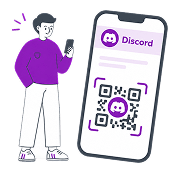
The most common use case: generate a QR code from your invite link, put it anywhere — a poster, a stream overlay, a slide deck — and anyone who scans it joins your server with one tap. No copy-pasting URLs, no hunting for the server by name, no links that stopped working at 3am before your event.
Discord Login QR Code — What's the Difference?
Discord also has a built-in login QR code — a separate feature inside the app used to sign into your account on a new device without typing your password. That's not what this generator does. Our tool creates invite QR codes that bring new members to your server. If you need the login QR, open Discord on your phone → tap your avatar → the QR icon is in the top right corner.
How to Create a Discord QR Code in 3 Steps
-
1
Get Your Discord Invite Link
Right-click your server name → Invite People → copy the link. One thing worth doing here: set the link to never expire before you copy it. A printed QR code with a dead link is just a decorative square.
-
2
Customize the Design
Paste the link above and make the code yours — add your server logo in QR code, pick colors that match your community, and choose a shaped style QR code. A branded code gets scanned more. People trust something that looks intentional over a generic black-and-white square they've never seen before.
-
3
Download and Put It to Work
Export as PNG for digital sharing, PDF for print, or Image for embedding. The code is ready the moment you download it — no account needed, no email confirmation, nothing standing between you and your next community member.
Why Use a QR Code Instead of Just Sharing the Link?
A Discord QR code makes it easier for people to join your server from both online and offline environments. A Discord invite link is easy to ignore, easy to lose, and — if it expires — completely useless. A Discord QR code stays wherever you put it.
-

Works Offline
A link doesn't work on a poster. A QR code does. Put it on merch, event badges, printed flyers, a whiteboard in your classroom — anywhere your audience actually is, not just where they might see a chat message.
-
Zero Friction for New Members
One scan and the user is already on your server join screen. No typing, no copy-pasting, no chance of someone entering the wrong invite and giving up. The fewer steps between "I'm interested" and "I joined," the more members you keep.
-
Branded and Recognizable
Your code can look like your server — logo centered, colors matched, design intentional. Generic codes get ignored. A code that looks like it belongs to something real gets scanned.
Static vs Dynamic — Which One Do You Need?
With a dynamic QR code, you can swap out the invite link any time — even after the code is already on 500 printed flyers. Discord links expire. Your QR code doesn't have to.If you're sharing a code digitally or testing an idea — static is fine. If it's going on print, merch, or anywhere you can't easily update, dynamic is the safer bet.
| Dynamic QR Code | Static QR Code | |
| Change link after printing |

|

|
| Scan tracking & analytics |
|
|
| Works forever |
|
|
| Free |
|
|
Who Uses Discord QR Codes?

Gaming & Streaming
At a LAN party, a single QR code on the wall means every player joins the right voice channel in seconds — no one's fumbling with invite strings or wasting RAM running Discord on their gaming rig. For streamers, a QR code in your overlay or end screen quietly turns viewers into community members. Far more effective than "link in description," which exactly nobody reads.
Education
A teacher who puts a Discord QR code on the first slide of their course never has to say "did everyone get the invite?" again. Students scan it, join the server, and class coordination moves to a place that actually works — not a group chat that dies after week two.
Marketing
The best Discord communities aren't built by sharing links — they're built by showing up where the audience already is. A QR code with the link on event merch, a conference badge, or a creator's video end card does what a link in a bio never can: it catches people in the moment, in the real world, when they're actually paying attention.

Nonprofits
Coordinating volunteers over email is chaos. QR code for nonprofits that move their communities to Discord get faster responses, better engagement, and a space people actually check. A QR code on a donation table or awareness poster removes the last barrier — new members don't need to know what Discord is to scan a code and show up.
Customization Options
A Discord QR code that looks like yours gets scanned more than one that looks like everyone else's. Customize your Discord QR code to match your community.
-

Logo and Branding
Upload your server logo to the center of the code and set colors that match your community's palette. The difference between a branded QR code and a plain one isn't just aesthetic — it's the difference between something people trust and something they scroll past.
-

Shapes and Styles
Standard squares work. Shaped designs — rounded dots, custom corners, unique patterns — stand out. Add a short label like "Scan to Join" underneath and you've eliminated the last bit of hesitation for anyone who's never scanned a QR code before.
-

Download Formats
PNG for social posts and digital embeds. PDF for anything going to print. Image for dropping into decks, docs, or emails. All formats export at full resolution — scale them up to a banner or down to a sticker, they'll scan either way.
-

Share Everywhere
Share your Discord QR code on platforms like Instagram, YouTube, Reddit, Telegram, or WhatsApp. Bundle it into a list of links page alongside your other community channels. Drop it into a PPTX presentation or a Google Doc. If you want to know how many people are actually scanning — and from where — a dynamic QR code gives you that data.
Get Your Discord QR Code
Over 6.8 million users rely on our platform to generate QR codes for everything from Discord servers to payment links, Wi-Fi access, vCard contacts, and beyond. Whatever you need a code for — this is where you make it.
FAQ
Was This Article Helpful?
Click on a star to rate it!
Thank you for your vote!

Be the first to rate this post!














